Building a Small SSO Flow for a College Microservices Project
Published Jun 08, 2026
How we centralized authentication across separate college project modules and made the handoff safer for the team.
For one of my college projects, my team built a travel-related application split across five separate modules: flight, hotel, payment, travel, and a few supporting features. Each person owned one module, and I led the team while owning the flight module.
At first, the architecture looked simple. Everyone could just build their own pages, their own flows, and their own module-specific logic. But authentication quickly became the part that forced us to think more seriously about system boundaries.
The question was: if our app is split into multiple independently developed modules, where should login live?
One option was to let every module implement its own login flow. That would make each module easier to develop in isolation, but it would also duplicate logic across the team. Every module would need to understand users, tokens, sessions, and auth state. For a project meant to simulate microservices, that felt wrong.
So we chose a different approach: one module would own authentication.
In our case, the flight module became the identity provider. The user table lived there. Login happened there. Other modules did not need to know how authentication worked internally. They only needed a way to request and receive a valid token.
That decision made the system cleaner, but it introduced a new problem: how do we transfer authentication state from one frontend to another?
Because each module was served from its own frontend, we could not simply share localStorage directly. Browser storage is scoped by origin, which is good for security, but it also means one module cannot casually read another module's token. We needed a controlled handoff.
The flow we built was inspired by how SSO-like systems work.
When a user clicks "Login" from another module, that module opens a small popup window pointing to the flight module's SSO page. The popup checks whether the user is already logged in on the flight side. If the user is authenticated, the flight module sends back a payload containing the token and username to the original window.
The receiving module listens for that message, validates where it came from, and then stores the token in its own local storage.
The important detail here is origin validation.
Without checking the sender's origin, any random website could try to send a fake authentication payload. So the receiving module compares event.origin against the expected provider origin before accepting the message. If the message does not come from the trusted flight module, we ignore it.
That small check changes the flow from "just send a token between windows" into a more intentional trust boundary.
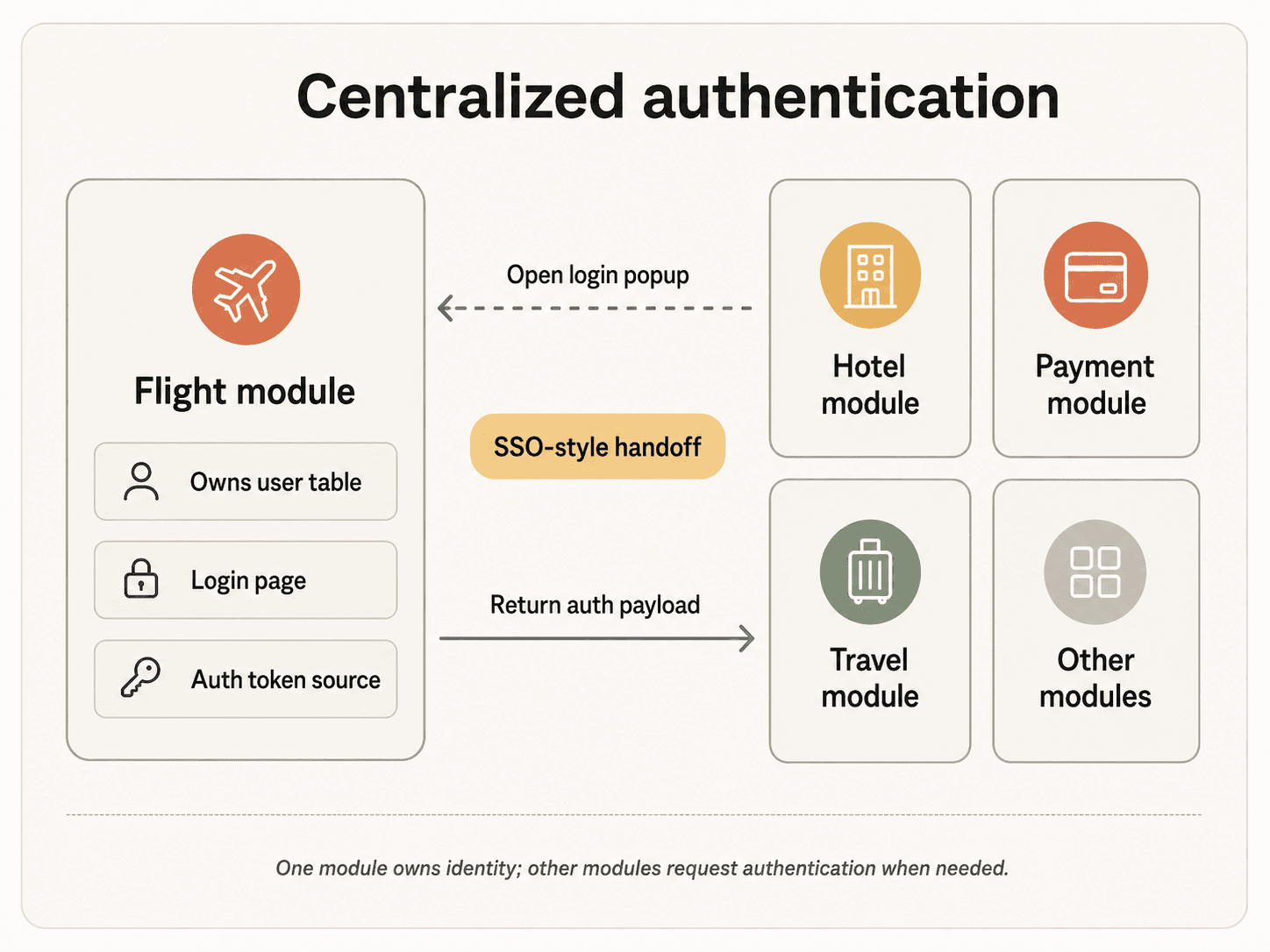
The implementation looked roughly like this: each teammate added a login button to their module, called a shared openSSOPopup() helper, and waited for the SSO response. I pushed the helper file to the team branch so everyone could integrate auth without needing to understand the entire flight module.
This was one of the parts I enjoyed most as a team lead. The technical problem was not only building the auth flow for myself. It was designing an integration path that my teammates could actually use.
The helper had to hide enough complexity to be convenient, but still expose the important behavior: open the popup, listen for the response, validate the origin, handle popup blocking, detect if the user manually closes the window, and clean up event listeners afterward.
In other words, the hard part was not the login button. The hard part was making centralized authentication feel simple from the outside.
There were also tradeoffs.
For this project, we stored the received token in localStorage because it was easy to integrate across modules and good enough for the scope of the assignment. But this is not something I would blindly treat as production-grade security. If a frontend has an XSS vulnerability, tokens in localStorage can still be exposed.
A stronger production version would likely use short-lived tokens, stricter trusted-origin allowlists, state or nonce validation, HTTPS-only deployment, and possibly HttpOnly cookies or a more formal OAuth-style authorization flow.
But as a college project, this was a valuable engineering exercise because it forced us to think beyond "does the page work?" and into "where does trust live?"
We started with five people building five separate modules. We ended up needing a shared identity boundary, a token handoff mechanism, and a safer integration pattern for the whole team.
That is what made the project interesting to me.